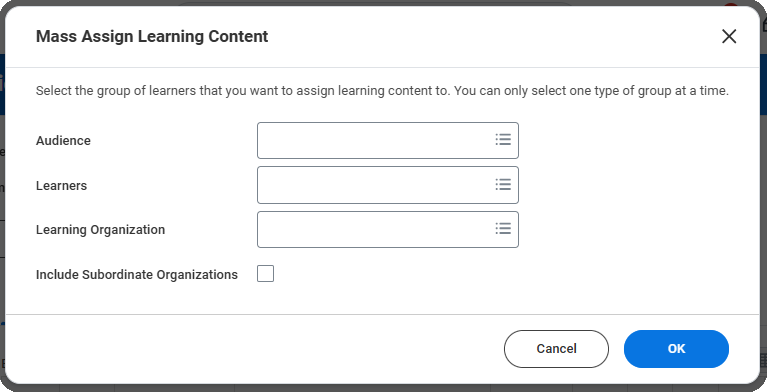
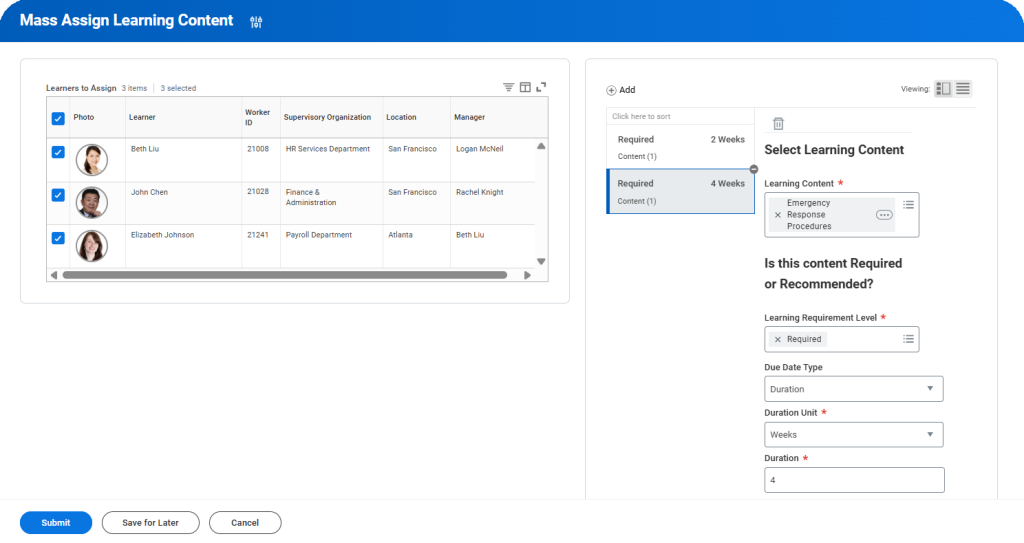
Assignments vs. Enrollments has been a longstanding pain-point within Workday Learning. This update does not rid us of all the complexity, but it helps! The ability to create assignments ad-hoc will allow us to be less reliant on campaigns and more easily push blended content that allows learners to select their specific offerings. Assignments having their own BP events will make them easier to track and notify learners of assignments.
Completing Learning Assignments
Automatically Available
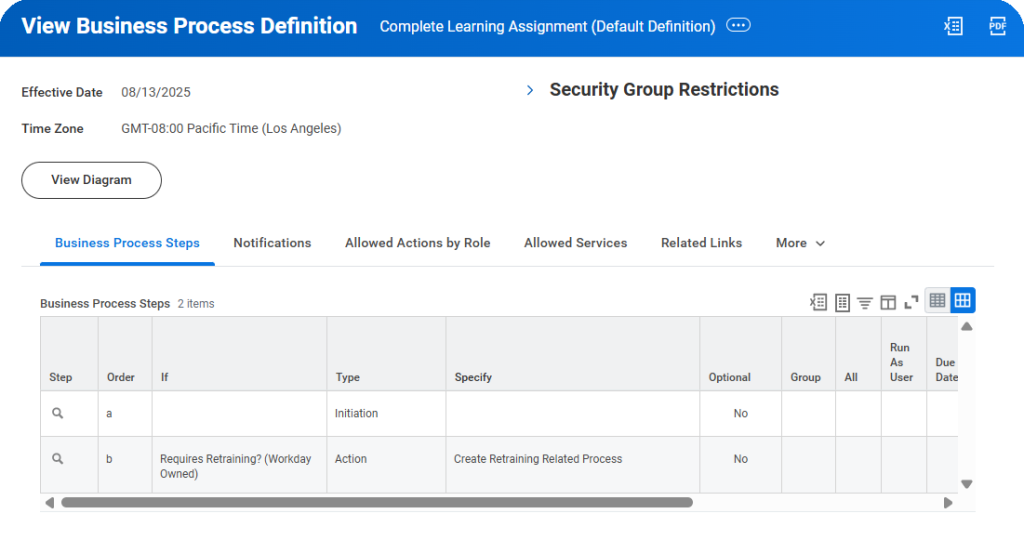
In addition to business processes for creation, Workday has added a business process for learning assignment completion. End-users are unlikely to notice BUT this drastically increases admin configuration options (think BP notifications instead of configured alerts!). This also brings the overall handling of Learning Assignment Events more in line with Learning Enrollments and other Action Events throughout your tenant.
Enforce Content Order in Programs
Automatically Available
We have always been able to indicate a program content order, but not require learners to follow that cadence. Now we have the option to enforce program content order and block learners from navigating to subsequent content until prior content is completed. This is especially impactful if program content is building upon prior content, or final surveys/assessments are meant to occur in a specific sequence.
Acknowledgement Lesson Type
Automatically Available
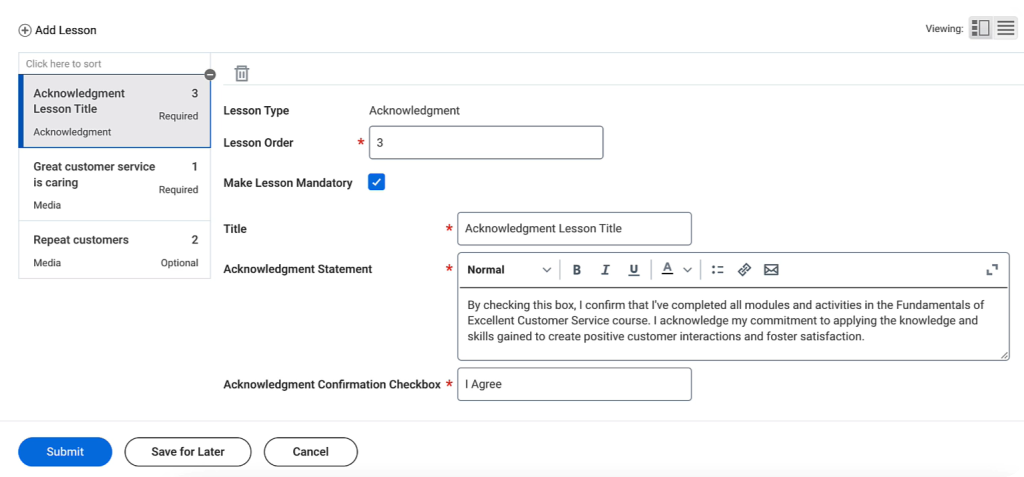
Acknowledgements within learning have been a highly requested feature that Workday didn’t have a clean solution for, until now! With this new lesson type, we can easily include acknowledgements to our catalog on a course-by-course basis with customizable text prior to course completion.
Audience Builder Filtering and Preview
Automatically Available
Creating audiences continues to get easier with new Audience Builder features. Audience creation now allows you to select a Data Source Filter alongside a Data Source to further streamline your audience and mimic a report building experience. Previewing your audience has also gotten more robust with the ability to add informational columns to confirm you are capturing the correct cohort.
Task Naviation for Learners
Automatically Available
Making it easier for learners to click around and explore is always a good thing. Prior to this update, navigation thru the Learning dashboard was a bit disjointed with certain tasks taking you out of the dashboard entirely. Workday has injected the pop-up modal that we are seeing sprinkled everywhere, so learners can explore without losing their place.
GenAI Learning Content Descriptions
Setup Required
Creating course descriptions can be labor-intensive with significant variance in quality & style. Enabling GenAI for learning descriptions saves time and can improve uniformity across your learning content catalog. Depending on the current status of your learning content descriptions, these AI generated summaries may prove to be clearer & more accurate, improving overall machine learning search & recommendation results.
Observational Checklist
Setup Required
Any grading guidance for Learning Assessors and Instructors likely exists outside of Workday. With this update, we have the option to bring this guidance into Workday via Observational Checklists. This new learning object is a compiled list of sections, tasks, and criteria to be used as a grading reference. For the time being, these cannot be added directly into learning content.
Skills Support on CCL
Setup Required
This update allows us to feed all possible data into Workday’s machine learning and incorporate external content more accurately into learning recommendations for career development.
Engagement Builder UI
Setup Required
If you leverage campaign reminders heavily, I would not recommend this feature just yet. However, this Engagement Builder framework in general is a drastic improvement on campaign creation & management. With updated UI and all tasks bundled together for one-stop-shopping, Engagement Builder is far and away easier to leverage that present campaign-building functionality. This functionality was released in 2025R1 but did not include the ability to configure content reminders. It still does not but this potential deal-breaker has been identified as a “What’s Coming Next” item. In the meantime, we’ve now got the ability to duplicate and enable translations.
Udacity Available in CCL Platform
Setup Required
Workday learning continues to diversify the learning content accessible to you via existing integration with CCL. This inclusion of Udacity makes it easier to accommodate and support the variety of corporate learning content decisions while maintaining Workday as your one-stop-shopping single source of truth. Great news for clients currently using or considering Udacity!
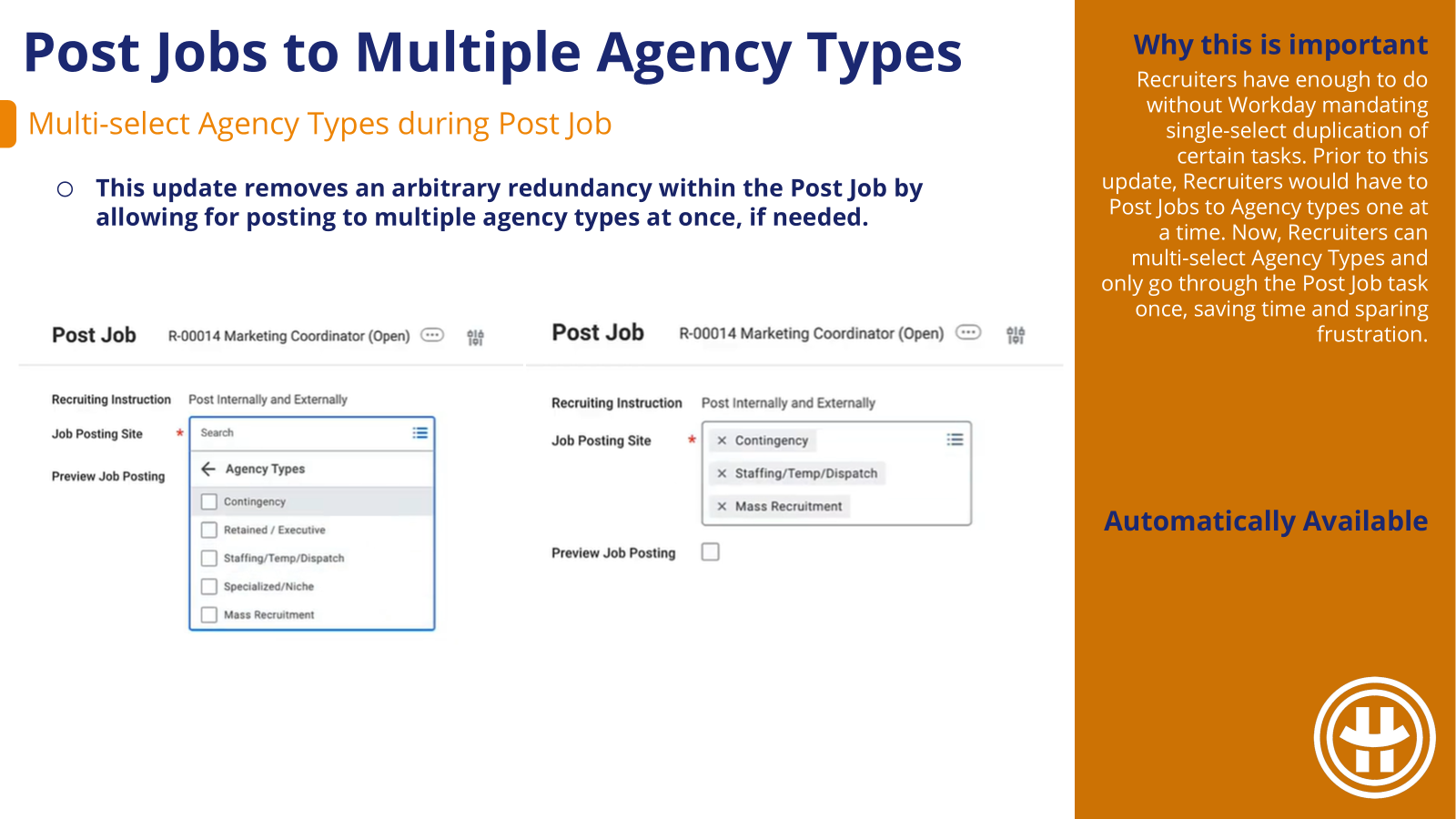
Recruiters have enough to do without Workday mandating single-select duplication of certain tasks. Prior to this update, Recruiters would have to Post Jobs to Agency types one at a time. Now, Recruiters can multi-select Agency Types and only go through the Post Job task once, saving time and sparing frustration.
GeoIP Country Code in Career Sites
Automatically Available
In the spirit of making an external candidate’s application process as smooth as possible, Workday has several tiers of logic built in to how an external career site country defaults. To increase the accuracy of this defaulting, Workday has swapped out browser’s locale and swapped in IP address/GeoIP Country Code.
Examine for Onboarding Issues Task
Automatically Available
Keep the new hire onboarding experience seamless and avoid disruptive errors with Workday’s new onboarding task designed to catch common configuration errors. Admins get peace of mind and new hires have a smooth onboarding experience.
Candidate Availability for High Volume Recruiting
Setup Required
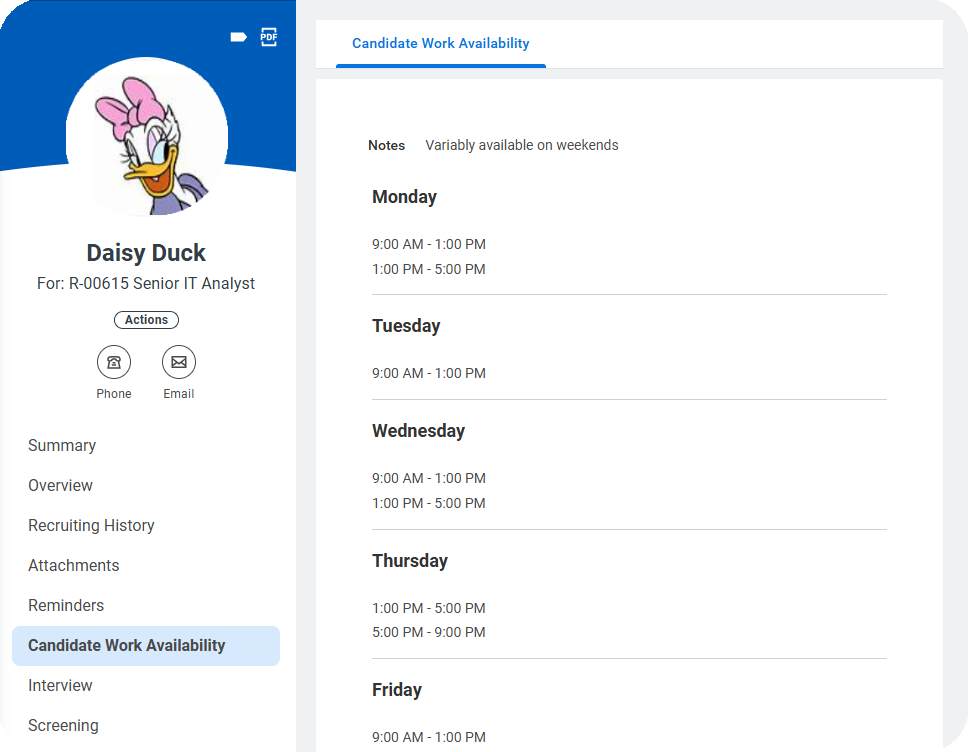
With this update, gathering candidate availability has been formalized to run similar to configured candidate questionnaires. Now, rather than relying on questionnaires or recruiter conversations, availability has its own dedicated configurable template, application section, and report fields. Targeted for high-volume recruiting but applicable for any type of shift work, this feature will allow recruiters to more efficiently identify candidates who match staffing needs.
Job Architecture Hub
Setup Required
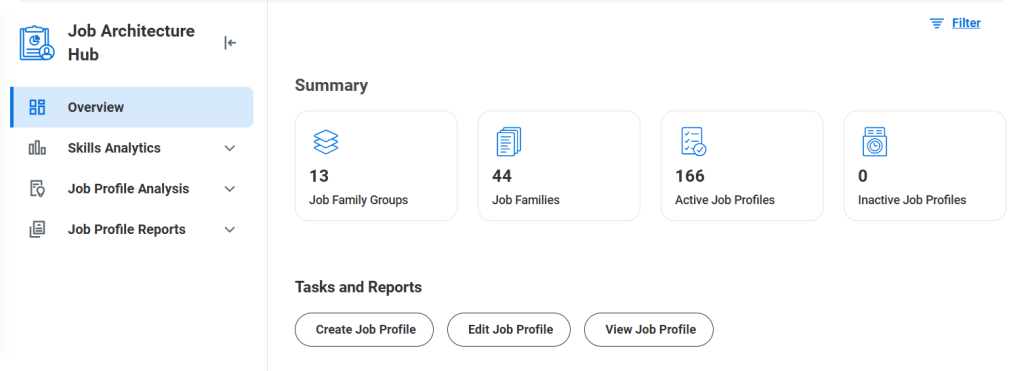
With this update, Workday has made it easier for admins to analyze and act on insights gleaned from delivered job architecture reporting. The job catalog and overall job profile hierarchy are critical foundational elements of any tenant. Being so important, it should be easy to access generalized data on this structure. With this update, now it is.
Constrained Prospect Security by Country
Setup Required
In addition to staying compliant with GDPR requirements, this update will allow us to streamline information visible to recruiters to only the most relevant/likely prospects. As an added benefit, this feature is Recruiting-specific, whereas previously to achieve something like this we would need to leverage more universal locations & location hierarchies. Recruiting Regions can, if needed, be structured differently without impacting HCM or FINS organizational requirements.
Bulletins in Onboarding Plans
Setup Required
Building upon the Onboarding Planner functionality delivered in 2025R1, Workday has included a new Bulletin Content Type that acts like a series of nested announcements allowing for the delivery of a larger volume of information in a slider format. This added content type variety lets us further engage and inform new hires without the onboarding plan becoming too busy and overwhelming.
My Conversations
Setup Required
For customers using Candidate Conversational Messaging for SMS, response speed is an important factor. To avoid these specific message notifications getting lost in the shuffle of all the other notifications recruiters receive, Workday has split out these conversational notifications to allow for more efficient identification and prioritization.
Social Sign In for Candidate Accounts
Setup Required
Candidate Home Account creation is a necessity for certain stages of the application process, but is an extra step in the process can be cumbersome for candidates. To streamline the process for creating candidate home accounts, Workday has integrated with Apple & Google to leverage a candidates existing credentials and provide a similar UX to other credentialed platforms.
With this update, gathering candidate availability has been formalized to run similar to configured candidate questionnaires. Now, rather than relying on questionnaires or recruiter conversations, availability has its own dedicated configurable template, application section, and report fields. Targeted for high-volume recruiting but applicable for any type of shift work, this feature will allow recruiters to more efficiently identify candidates who match staffing needs.
Job Architecture Hub
Setup Required
With this update, Workday has made it easier for admins to analyze and act on insights gleaned from delivered job architecture reporting. The job catalog and overall job profile hierarchy are critical foundational elements of any tenant. Being so important, it should be easy to access generalized data on this structure. With this update, now it is.
Bulletins in Onboarding Plans
Setup Required
Building upon the Onboarding Planner functionality delivered in 2025R1, Workday has included a new Bulletin Content Type that acts like a series of nested announcements allowing for the delivery of a larger volume of information in a slider format.
Creating Learning Assignments
Automatically Available
Assignments vs. Enrollments has been a longstanding pain-point within Workday Learning. This update does not rid us of all the complexity, but it helps! The ability to create assignments ad-hoc will allow us to be less reliant on campaigns and more easily push blended content that allows learners to select their specific offerings. Assignments having their own BP events will make them easier to track and notify learners of assignments.
Completing Learning Assignments
Automatically Available
In addition to business processes for creation, Workday has added a business process for learning assignment completion. End-users are unlikely to notice BUT this drastically increases admin configuration options (think BP notifications instead of configured alerts!). This also brings the overall handling of Learning Assignment Events more in line with Learning Enrollments and other Action Events throughout your tenant.
Acknowledgement Lesson Type
Automatically Available
Acknowledgements within learning have been a highly requested feature that Workday didn’t have a clean solution for, until now! With this new lesson type, we can easily include acknowledgements to our catalog on a course-by-course basis with customizable text prior to course completion.
Engagement Builder UI
Setup Required
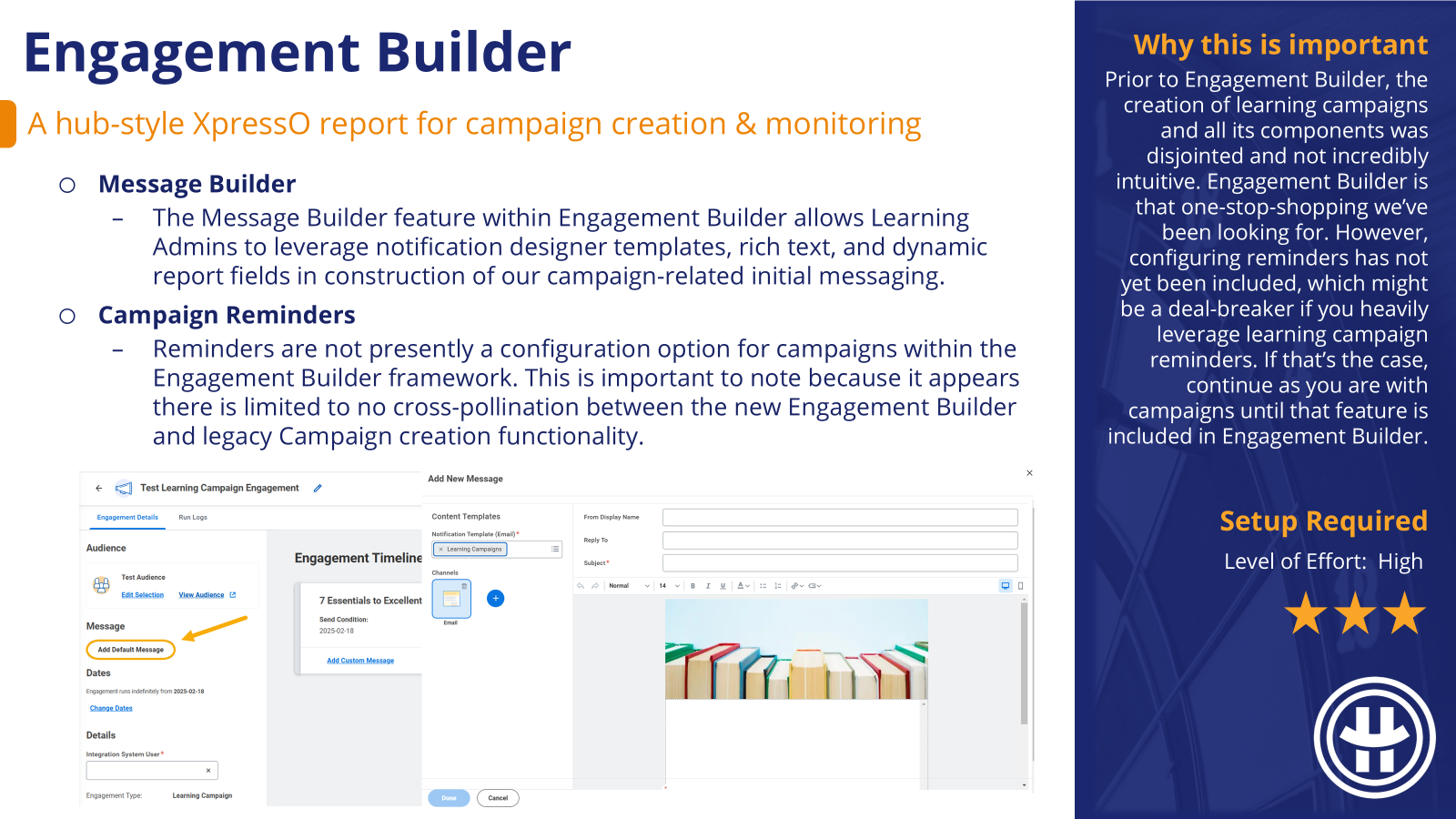
This Engagement Builder framework is a drastic improvement on campaign creation and management with updated UI and all tasks bundled together for one-stop-shopping. This functionality was released in 2025R1 but did not include the ability to configure content reminders. This potential deal-breaker has been rectified, making Engagement Builder a holistic & well-rounded replacement for how we used to manage campaigns.
Mass Populate Worker Skills
Automatically Available
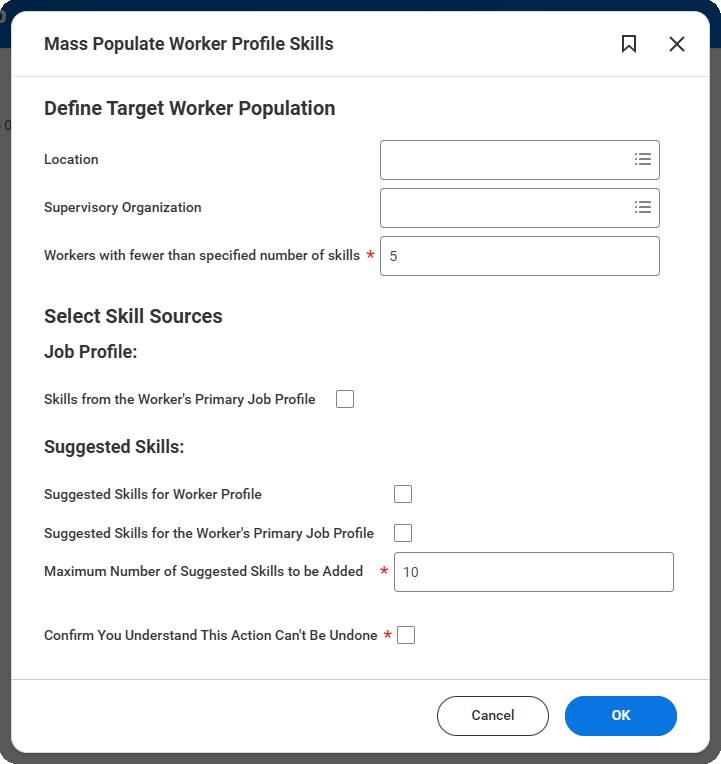
Relying on individual workers manually adding skills to their worker profile has mixed results. This mass action from 2025R1 made it easier to holistically populate skills on individual workers for your entire workforce, better utilizing suggestions & connectivity from Skills Cloud. These newly added options provide further flexibility and control within the Mass Populate task.
Delivered Skill Categories & Groups
Setup Required
Save time & effort in creating your own skill categories and category groups by activating Workday-delivered ones. Edit at your leisure to make them your own. Categories and Category Groups can be leveraged to streamline skill browsing and add insight into reporting, injecting structure into the massive dataset that is Skills Cloud.
Skills Fit Analysis
Setup Required
Up to this point, it hasn’t been easy to glean insight from available corporate skill data without sizeable custom reporting efforts. This delivered Skills Fit Analysis report is able to leverage both suggested skills and explicit skills in its comparison and analysis so there’s no barrier to entry for gaining insight.
Relying on individual workers manually adding skills to their worker profile has mixed results. This mass action makes it easier to holistically populate skills on individual workers for your entire workforce, better utilizing suggestions & connectivity from Skills Cloud.
Advance Steps in BP: Assess Skills
Automatically Available
With this update, we gain access to the administrative manual advance functionality available on other BPs. As we see elsewhere in Talent, the changes made while a business process remains in progress are not made “real” until the process successfully completes. Problematic if we want to retain the data but have tasks collecting dust in folks’ inboxes. The availability of manual advance here aligns the functionality of Assess Skills with business process administration across Workday.
Onboarding & Journey for Career Hub
Automatically Available
Workday’s small-but-mighty interface tweaks make the initial end-user setup within Career Hub / Opportunity Marketplace a more intuitive and user-friendly first touch-point. The proliferation of the familiar bookmark icon increases UX consistency across functional areas and encourages Career Hub / OM users to flag items for exploration later, making even quick stints into Career Hub valuable.
Job Match Analysis for Career Hub
Automatically Available
Workday has made the match analysis for suggested jobs within Career Hub / Opportunity Marketplace more accessible via the side-panel details tab. Understanding why Workday has suggested a job opportunity to you will help our end-users compare suggested job opportunities and act on the suggestion that best aligns with their career path.
Link Individual Goals to Flex Teams
Setup Required
This update increases the interconnectivity of individual goals with other objects in Workday and allows employees to cite specific flex teams they have participated in to support their achievement. Allowing end-users to link specific flex teams bolsters both the specificity of their goals as well as the value add of flex teams.
Flex Team Details on Mobile
Automatically Available
Previous UI updates to Flex Teams have now, with this update, been applied more consistently across the board for Browser, Mobile App, and Mobile Browser. Nothing so drastic as to cause confusion with your end-users, but a much more consistent experience across touchpoints.
Autosave Give Requested Feedback
Automatically Available
The Workday 24R2 updates introduced autosave for employee reviews; now we see this functionality extended to Requested Feedback. Anytime thoughtful large text blocks are involved, autosave is a fantastic option to avoid losing progress. With autosave automatically occurring every 90 seconds, the loss of work is minimized as is the need to manually press “Save for Later.” . This update will prevent loss & rework, improving the overall feedback experience.
Print Reviews for Additional Personas
Automatically Available
Printing an employee review was previously only available to individuals who had access to the Performance tab of a worker profile. With this update, Workday surfaces another Print opportunity within the View UI in their inbox My Tasks for employee reviews leveraging Guided Experience.
This update is geared towards making the lives of Learning Admins a bit easier. Previously, Learning Admin search records were a bit hectic. The end-user experience was clean, but there wasn’t a way to hide inactive content from our learning super-users. Now our tenant looks cleaner and inactive learning content only appears to us when we’re actively searching for it.
Email Validation for External Learners
Automatically Available
Workday maintains a list of invalid email domains that is now being leveraged within External Learning User tasks as a validation rule against associating an External Learning User with an invalid email address. This validation rule will improve data accuracy for your External Learners and mitigate missed communications resulting from simple typos.
AI Summarizing Content Feedback
Automatically Available
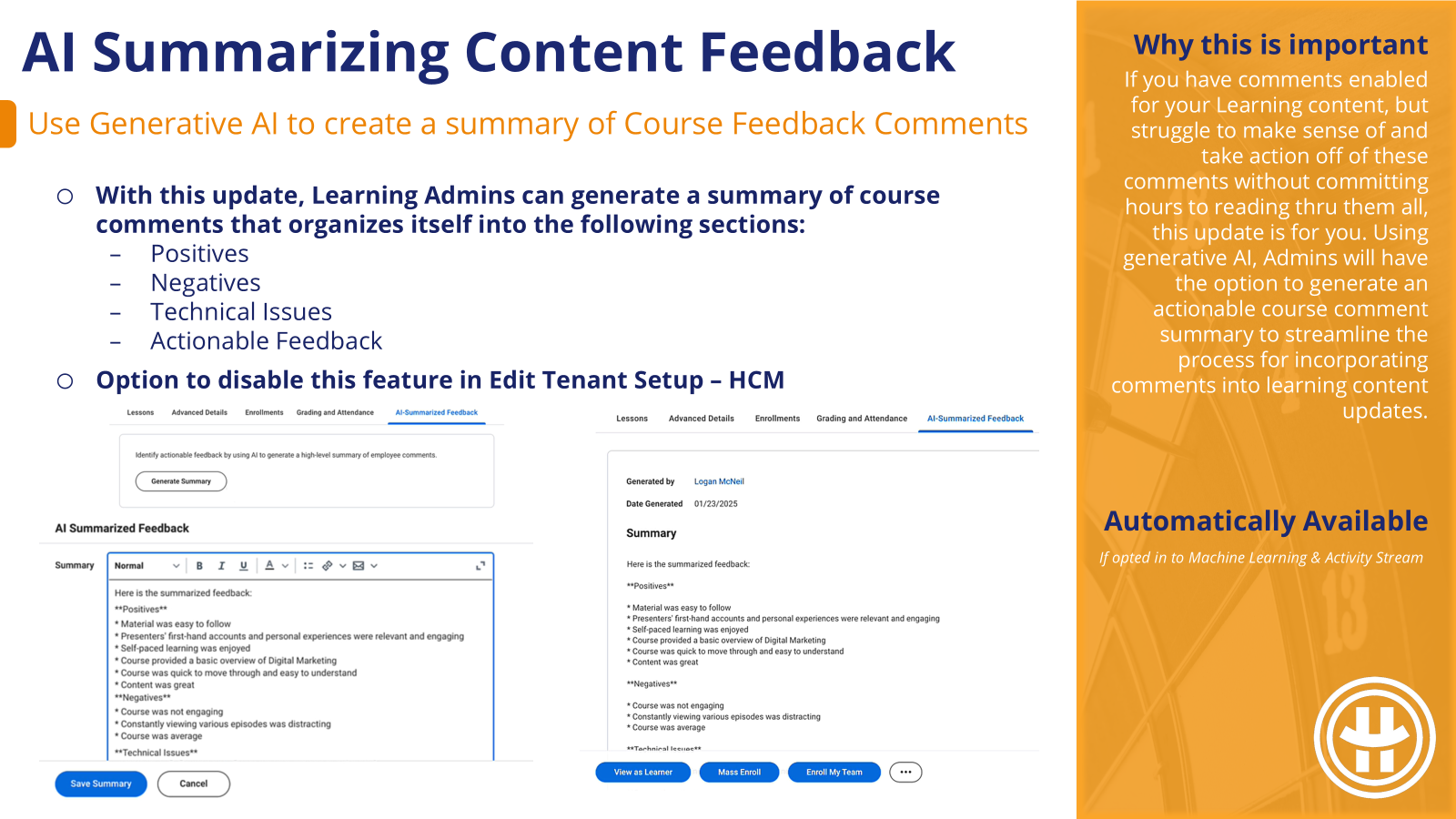
This upate is automatically available IF your organization is already opted into Machine Learning & Activity Stream (aka presently leveraging course comments). If NOT, setup is required to do those two things. But if you DO have comments enabled for your Learning content, and struggle to make sense of and take action off of these comments without committing hours to reading thru them all, this update is for you. Using generative AI, Admins will have the option to generate an actionable course comment summary to streamline the process for incorporating comments into learning content updates.
Language-Based Recommendations
Setup Required
If you have a multi-language learning catalog, chances are good that the value of learning recommendations is being limited by the language of that content recommendation. This update gives us the option to surface a language preference designation that will allow Learners to influence the language of the learning content that is pushed to them, increasing the value of recommendations.
The Enhanced CCL Platform
Setup Required
Workday’s enhanced CCL platform is intended to make it easier for 3rd party content providers to integrate with Workday Learning. This ultimately means more Learning Content options for us. It also appears to more easily outline the path to Partnership so providers you presently leverage that are not on this list could begin development of an integration to join this list. From the administrative perspective, Workday has also consolidated CCL configuration tasks into one for ease of setup.
Engagement Builder
Setup Required
Prior to Engagement Builder, the creation of learning campaigns and all its components was disjointed and not incredibly intuitive. Engagement Builder is that one-stop-shopping we’ve been looking for. However, configuring reminders has not yet been included, which might be a deal-breaker if you heavily leverage learning campaign reminders. If that’s the case, continue as you are with campaigns until that feature is included in Engagement Builder.
This update finally allows us the same functionality within Onboarding that is available elsewhere in your tenant. Prior to this, Onboarding was left in the stone-ages with conditional text block configuration in regular documents to utilize dynamic fields. Or forsaking dynamic fields entirely and using static PDFs. If you’ve got review document steps in Onboarding where you settled for a static PDF, it might be worth revisiting.
New Workday Onboarding Experience
Setup Required
With this new update, Onboarding has become more flexible and accommodating, allowing us to curate specific onboarding experiences for pre-defined audiences. All without the need to inject complexity into the Onboarding BP definition itself. Similar in style to Journeys, Workday has provided a new Onboarding Planner Hub to manage our different Onboarding Plans, Onboarding Audiences, and Onboarding content.
We now have the option to begin onboarding sooner, with touchpoints in the Offer and Employment Agreement business processes as well as Hire and Contract Contingent Worker. The Onboarding Plan worklet will replace the existing Onboarding Dashboard internally, and external candidates will have access to the Onboarding Plan within their Candidate Home account prior to tenant access once they get assigned an Onboarding Plan.
Non-US English Locales
Setup Required
This update is poised to improve data accuracy and the candidate experience. Prior to this update, the external career site would default to MM/DD/YYYY date formatting, causing confusion should the date formatting be different in the candidate’s region. Now, so long as the language is selected within the configuration of your external career site, Workday will honor the date format of the candidate’s location.
Enhanced Tracking for Agency Users
Setup Required
Prior to this update, Recruiting Agency Users did not have extensive security to see details of the Job Application stages for their candidates. It usually required manually effort on behalf of Recruiters or Recruiting Admins to provide additional details beyond the overridden candidate stage label. Now, we have the option to provide that additional detail through custom reporting without the need for security adjustments.
Multi-Language Search
Setup Required
With this update, the external career site search bar becomes a bit more language agnostic, improving the experience for bilingual candidates. A candidate would be able to view the external career site holistically in one language, but search for a key word or phrase in another language and still return results (if applicable translations exist).
Validation for Send Message Task
Automatically Available
Our candidate communications are not nearly as impactful as we would like if they wind up in our recipient’s spam folder. To mitigate this risk Workday will begin limiting the candidate grid functionality to a 1000 candidate max per batch. If this update is cause for concern, we will continue to have no cap on our ability to send messages via candidate pools.
Candidate Home Usability
Automatically Available
This update continues previous work from 24R2 to enhance the candidate home experience for external candidates who are prompted for additional tasks after their initial application submission. Instead of appearing in a new screen, candidates who are asked to Change Government Identifiers or Update U.S. Disability Status will appear in a pop-up window within the current screen. This update increases task efficiency as well as UX uniformity within the candidate home experience.
This update continues previous work from 24R2 to enhance the candidate home experience for external candidates who are prompted for additional tasks after their initial application submission. Instead of appearing in a new screen, candidates who are asked to Change Government Identifiers or Update U.S. Disability Status will appear in a pop-up window within the current screen. This update increases task efficiency as well as UX uniformity within the candidate home experience.
New Workday Onboarding Experience
Setup Required
With this new update, Onboarding has become more flexible and accommodating, allowing us to curate specific onboarding experiences for pre-defined audiences. All without the need to inject complexity into the Onboarding BP definition itself. Similar in style to Journeys, Workday has provided a new Onboarding Planner Hub to manage our different Onboarding Plans, Onboarding Audiences, and Onboarding content.
We now have the option to begin onboarding sooner, with touchpoints in the Offer and Employment Agreement business processes as well as Hire and Contract Contingent Worker. The Onboarding Plan worklet will replace the existing Onboarding Dashboard internally, and external candidates will have access to the Onboarding Plan within their Candidate Home account prior to tenant access once they get assigned an Onboarding Plan.
Docs & Doc Generation for Onboarding
Setup Required
This update finally allows us the same functionality within Onboarding that is available elsewhere in your tenant. Prior to this, Onboarding was left in the stone-ages with conditional text block configuration in regular documents to utilize dynamic fields. Or forsaking dynamic fields entirely and using static PDFs. If you’ve got review document steps in Onboarding where you settled for a static PDF, it might be worth revisiting.
Hide Inactive Learning Content
Automatically Available
This update is geared towards making the lives of Learning Admins a bit easier. Previously, Learning Admin search records were a bit hectic. The end-user experience was clean, but there wasn’t a way to hide inactive content from our learning super-users. Now our tenant looks cleaner and inactive learning content only appears to us when we’re actively searching for it.
Enhanced CCL for Learning Platform
Setup Required
This update has future excitement potential, but all content provider enhanced CCL integrations are presently “under development” so there is nothing to test/see right now.
Workday’s enhanced CCL platform is intended to make it easier for 3rd party content providers to integrate with Workday Learning. This ultimately means more Learning Content options for us. From the administrative perspective, Workday has consolidated all CCL configuration tasks into one for ease of setup.
Engagement Builder
Setup Required
I am really excited about the future potential of this update but, between you & I, I don’t think it’s quite there yet. Mostly because reminders aren’t slotted to be included in this framework until later. That will be a deal-breaker for . . . every client I’ve worked on learning campaigns with. HOWEVER, once reminders are included, this new UI is fabulous and a drastic improvement from how we’re creating & managing campaigns now.
Prior to Engagement Builder, the creation of learning campaigns and all its components was disjointed and not incredibly intuitive. Engagement Builder is that one-stop-shopping we’ve been looking for. However, configuring reminders has not yet been included, which might be a deal-breaker if you heavily leverage learning campaign reminders. If that’s the case, continue as you are with campaigns until that feature is included in Engagement Builder.
Mass Populate Worker Skills
Setup Required
If this update feels familiar, it was supposed to be included in 2024R2 but got delayed.
Relying on individual workers manually adding skills to their worker profile has mixed results. This mass action makes it easier to holistically populate skills on individual workers for your entire workforce, better utilizing suggestions & connectivity from Skills Cloud.
AI is turning up everywhere, and Workday is no exception. This may be our opportunity to work smarter, not harder, as generating job descriptions per job requisition can be time-consuming. This feature is new and experimental so it will still require review, but we stand to gain better, unique job descriptions more efficiently.
U.S. Federal Veteran’s Preference
Setup Required
With this update, Workday enables additional configuration beyond veteran’s status to verify Veteran’s Preference and include attachments. This will allow for easier verification of veteran’s status to meet government requirements, if needed.
Manager Insights Hub
Setup Required
Up to this point, there were a dozen delivered manager dashboards specific to different functional areas. And the Manager Insights Hub was no different – focusing solely on Talent & Career related items. But no longer! This update moves the Manager Insights Hub closer to one-stop-shopping for Managers with the inclusion of themes like Hiring and Staffing, Time Management, and Budgeting.
Hub Navigation Customization
Setup Required
Previous Hub customization options were limited. Workday 2024R2 makes it easier for you to customize the navigation experience of your hubs. This enables you to create your own navigation items and groups with custom labels. You can also use this new feature to group and re-order Workday-delivered and custom navigation items on hubs.
External Career Site Job Applications
Setup Required
Speeding up the application process and making it more enjoyable overall is a win. This update is a series of small but mighty tweaks to the application process that have historically been a nuisance to candidates. This is our first touchpoint with potential future hires, and these enhancements can help us put our best foot forward right from the start. To enable, navigate to Maintain Feature Opt-Ins > External Career Site Apply Flow Improvements
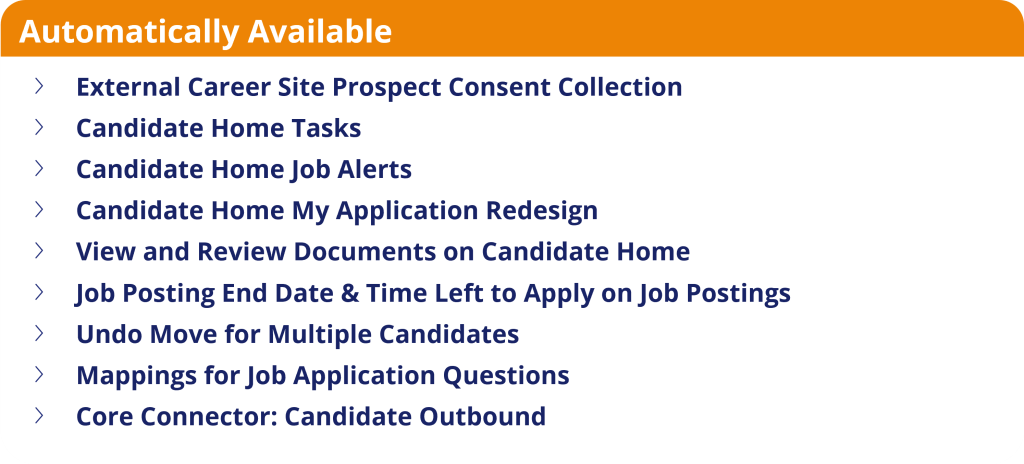
Undo Move for Multiple Candidates
Automatically Available
Prior to this update, if candidates were mistakenly moved in bulk, that action had to be undone one by one. And considering how delightfully easy Workday makes it to move candidates en masse, I’m thrilled we finally get an easy reverse. If this does accidentally occur at your organization, it can now be corrected in minutes rather than hours!
Candidate Home My Application Redesign
Automatically Available
A lot of focus has always gone into the initial Job Application experience, and rightfully so. But this update gives the post-application Candidate Home experience some much needed attention. These UX updates increase intuitive navigation and make it easier for candidates to review and act on their application after that initial submission.
View and Review Documents on Candidate Home
Automatically Available
The Candidate Home and post-initial application experience continue to receive attention in this update cycle. With this update, Workday has made the experience of referring to previously reviewed & submitted document tasks easier to access and more in-line with the job application navigational experience holistically.
Candidate Home Tasks
Automatically Available
With this update, Workday has streamlined the task experience for external candidates who are prompted to take additional action within the job application process after the initial submission of their application. Instead of navigating to a new screen, candidate tasks will appear in a pop-up window. This is supposed to
Candidate Home Job Alerts
Automatically Available
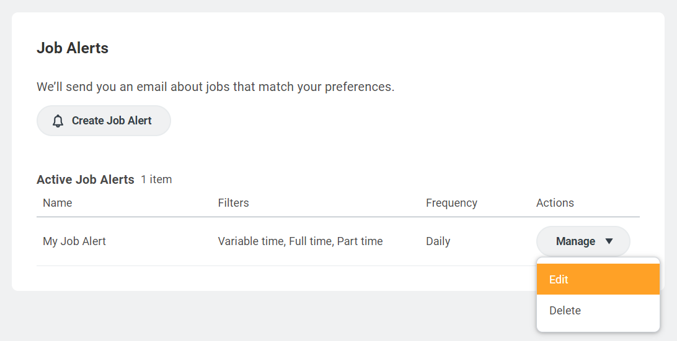
Workday continues to improve the candidate experience for functionality outside of the initial job application. This touchpoint is particular to Job Alerts, and follows the theme of pop-ups and side panels instead of new tabs, and actions bundled into a related actions button. All towards making the full candidate experience more accessible and intuitive
Posting End Date & Time Left to Apply
Automatically Available
Previous default behavior did not give candidates any indication of a deadline when reviewing posted jobs. This update is aimed to increase transparency and reduce the need for recruiter intervention if a candidate misses a deadline that they did not know about and wants the recruiter to submit on their behalf.
Prospect Consent Collection
Automatically Available
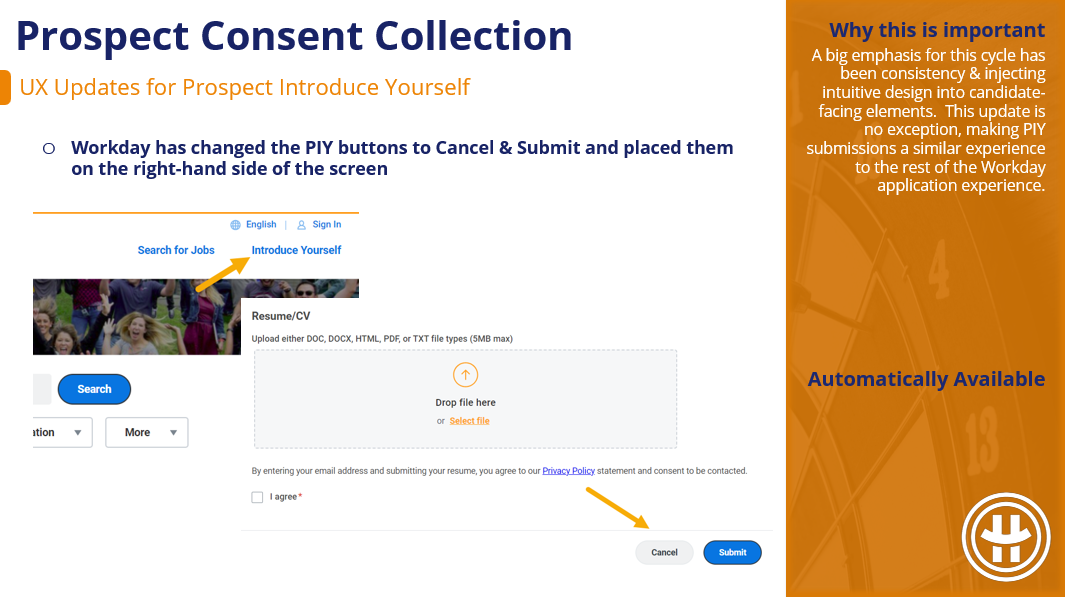
A big emphasis for this cycle has been consistency & injecting intuitive design into candidate-facing elements. This update is no exception, making PIY submissions a similar experience to the rest of the Workday application experience. This update is unlikely to knock your socks off but if you previously thought the PIY space was a bit clunky, hopefully this helps!
Mappings for Job Application Questions
Automatically Available
This update streamlines the background process for mapping custom questions to delivered questions within a job application. What used to be a 1 to 1 relationship can now be a 1 to multiple relationship. We can now accomplish the same goal with fewer custom questions.
Core Connector: Candidate Outbound
Automatically Available
If you’ve felt limited by the available capabilities and data fields within Workday’s Core Connector: Candidate Outbound integration template, this update is for you. Workday has beefed up the information you can include and leverage during launch as well as added to overall default capabilities with configuration options for output location and output file sequence ID.
Up to this point, there were a dozen delivered manager dashboards specific to different functional areas. And the Manager Insights Hub was no different – focusing solely on Talent & Career related items. But no longer! This update moves the Manager Insights Hub closer to one-stop-shopping for Manager tasks, agnostic of functional area.
Manager Insights Hub – Feedback
Automatically Available
Workday has made the Manager Insights hub more holistically useful to Managers this cycle with the inclusion of content outside of Talent & Performance. But they’ve ALSO made improvements to what presently existed in for Talent & Performance – namely in the realm of feedback.
Hub Navigation Customization
Setup Required
Previous Hub customization options were limited. Workday 2024R2 makes it easier for you to customize the navigation experience of your hubs. This enables you to create your own navigation items and groups with custom labels. You can also use this new feature to group and re-order Workday-delivered and custom navigation items on hubs.
Autosave for Guided Experience
Automatically Available
It’s complicated enough to get review completion without Workday deleting your progress. Workday session timeouts have been the cause of a lot of heartache and lost prose when it comes to employee reviews. The nature of the form frequently calls for thoughtful comments that take time to draft. With this update, we will no longer hear of lost work in employee reviews as this autosave feature automatically does what the “Save for Later” button did, now every 90 seconds.
Skill Assessment
Setup Required
Prior to this update, feedback and flex teams were our only recourse for sourcing skill ratings from others. With this new Skills Assessment business process, it’s more intuitive than I found the feedback avenue. We will only be limited by what security group(s) we include in our business process. Keep an eye on this update, it sounds like Workday intends to release MORE in a batch of 2024R2+ updates.
Suggested Skills for Workers
Automatically Available
This change will give us more control over skill suggestions and make those suggestions easier to track. Prior to this update, skill suggestions were driven most heavily by machine learning’s dotted-line designation of implicit (related) skills. This was not something we had much ability to influence or explain. Now, suggestions will come from straight-line sources, if applicable, first. And these straight-line sources are within our control.
Mass Populate Worker Skills
Setup Required
Relying on individual workers manually adding skills to their worker profile has mixed results. This mass action makes it easier to holistically populate skills on individual workers for your entire workforce.
Development Items, Skills & Mobile
Setup Required
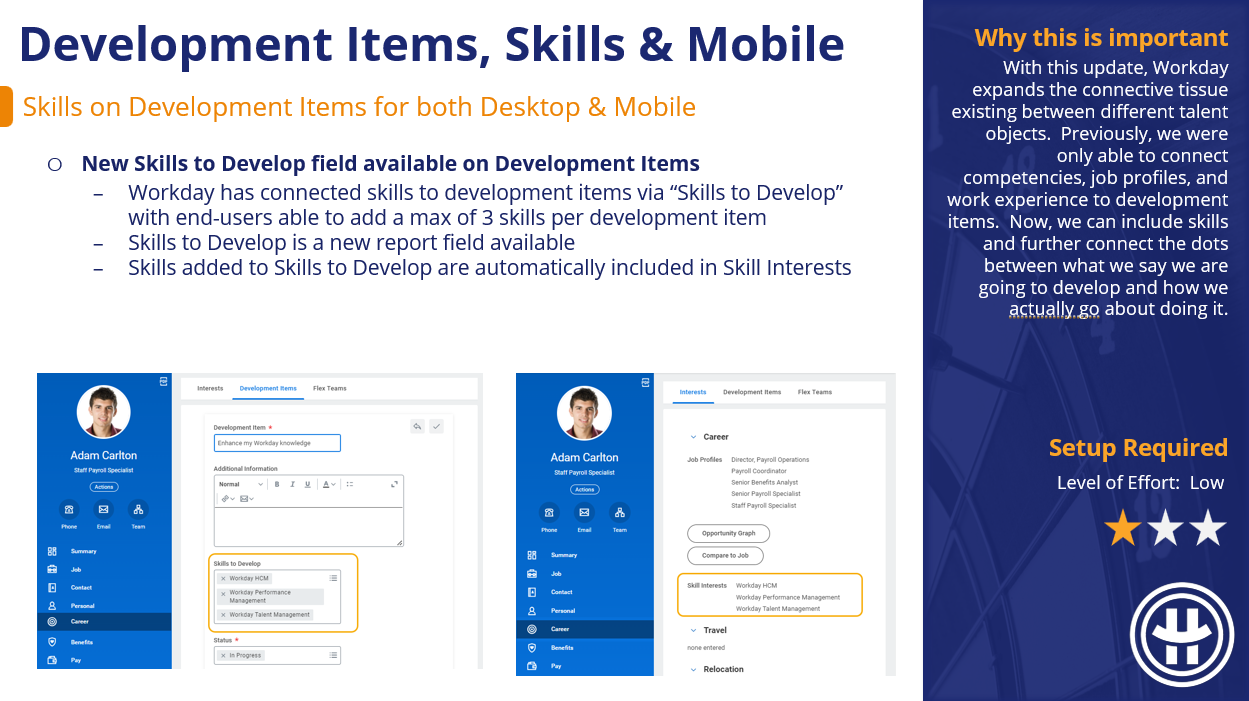
With this update, Workday expands the connective tissue existing between different talent objects. Previously, we were only able to connect competencies, job profiles, and work experience to development items. Now, we can include skills and further connect the dots between what we say we are going to develop and how we actually go about doing it.
Goals Redesign Multi-Management of Goals
Setup Required
The only real downside of the Goals User Experience Redesign prior to this update was that we could only create or edit goals one at a time. Workday has closed the loop there, displaying a Bulk Update button if we intend to act on multiple goals. If this was a blocker to adoption previously, this Goals Redesign functionality is definitely worth another look.
Goals Redesign for Mobile
Automatically Available
Ideally, the Workday experience would be the exact same on mobile as it is on desktop. We’re not quite there yet, but this is a wonderful step in that direction if you leverage goals and the Goals User Experience Redesign Changes that came out last cycle (and that I recommend!) goal displays on mobile will be the lovely card layout experienced on desktop.
Organizational Goals Configuration
Automatically Available
A step in the right direction for beefing up configuration options specific to organization goals. Small but mighty, we now have the option to show or hide org goal descriptions, whereas previously if we didn’t want a description to show, we had to leave it blank.
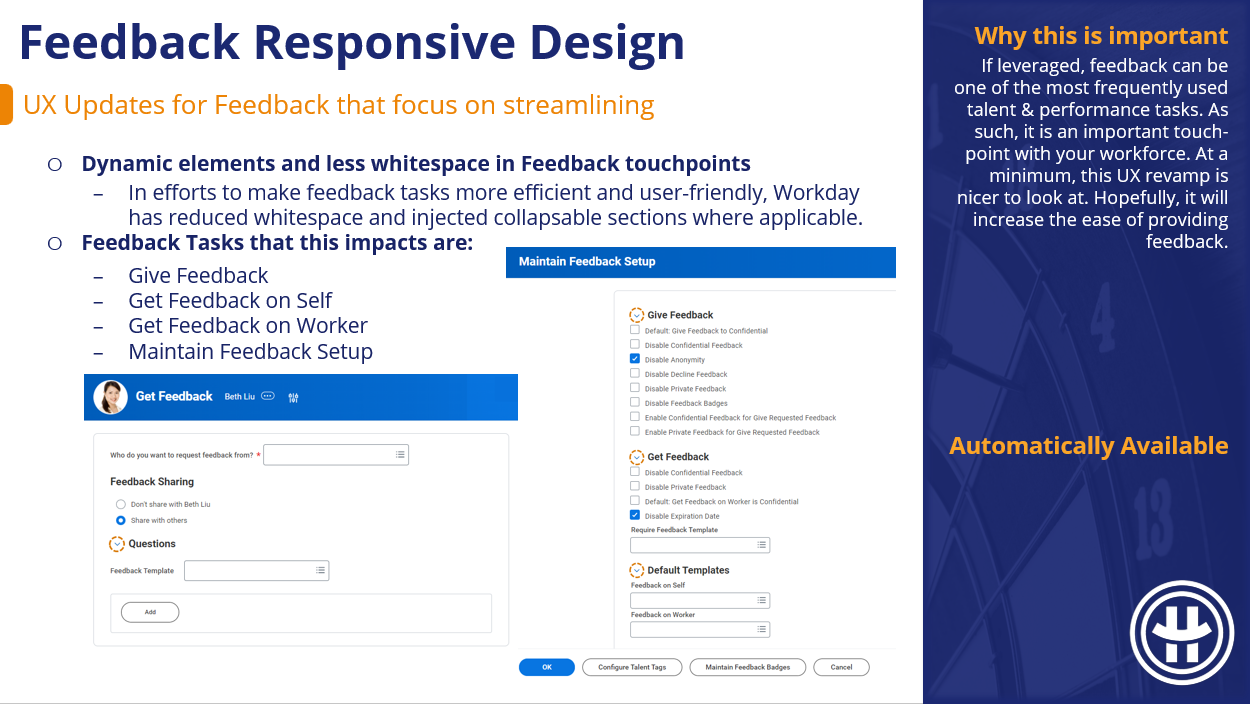
Feedback Responsive Design
Automatically Available
If leveraged, feedback can be one of the most frequently used talent & performance tasks. As such, it is an important touch-point with your workforce. At a minimum, this UX revamp is nicer to look at. Hopefully, it will increase the ease of providing feedback.
Development Items in Career Hub
Setup Required
This update brings development item functionality holistically into Career Hub and increases actionability via skills-driven suggestions. Now that skills can be placed on development items, Workday can take those skills to develop and identify Learning Content and Flex Teams that develop those skills.
Career Hub Explore Improvements
Automatically Available
Workday is putting a great deal of effort into Career Hub and the suggestions it generates. For Career Hub to be a viable and worthwhile career building tool, it’s suggestions should be attainable and contextually relevant to the end-user. These enhancements relative to the underlying skills and skill interests driving those suggestions is a step towards greater actionability.
Career Path Builder Seniority Filtering
Setup Required
Default behavior in the Career Path Builder doesn’t limit suggestions based on seniority, meaning it could recommend your next step be much higher or much lower than you are positioned presently. To provide more actionable suggestions, Workday has included the option to anchor these suggestions based on Job Level or Management Level.
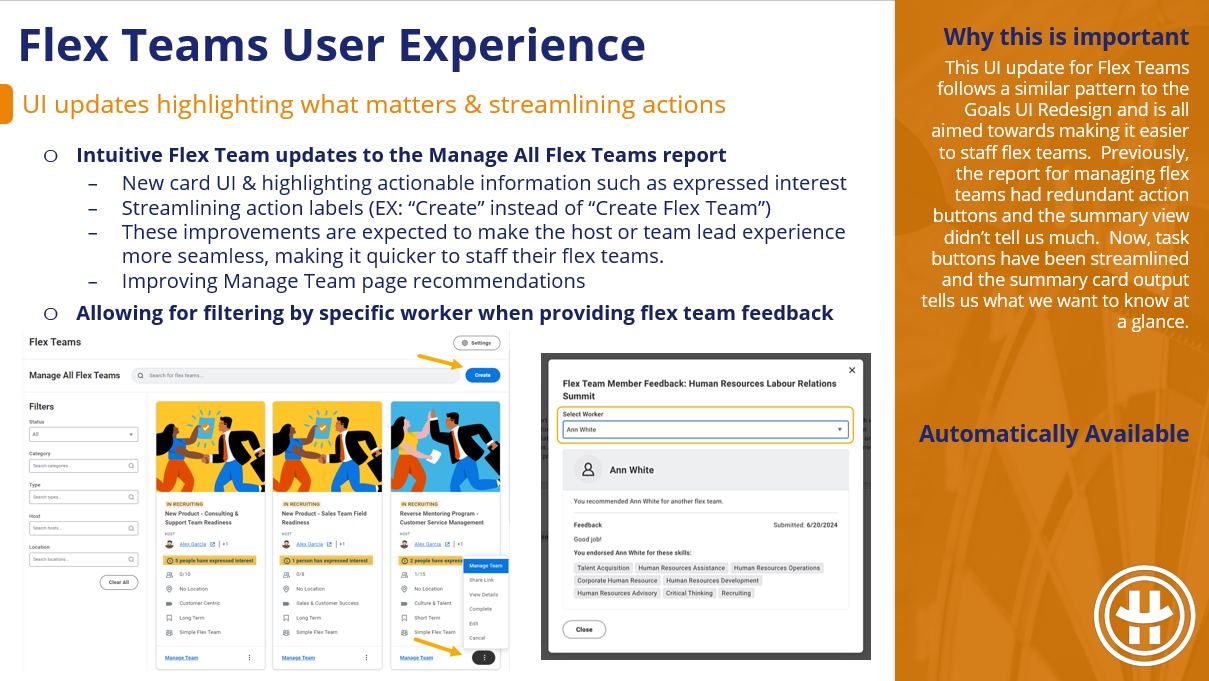
Flex Teams User Experience
Automatically Available
This UI update for Flex Teams follows a similar pattern to the Goals UI Redesign and is all aimed towards making it easier to staff flex teams. Previously, the report for managing flex teams had redundant action buttons and the summary view didn’t tell us much. Now, task buttons have been streamlined and the summary card output tells us what we want to know at a glance.
Flex Teams Without Career Hub or Opportunity Marketplace
Setup Required
Workday appears to be pushing for increased utilization of Flex Teams. To that end, this update makes flex teams that much more accessible no longer requiring you to access them via Career Hub or Opportunity Marketplace. Just because you aren’t using CH or OM doesn’t mean you can’t use flex teams.
Flex Teams Web Services
Setup Required
Workday is putting a good bit of effort into Flex Team adoption; it was a theme from 2024R1, and it is a theme for 2024R2. With any object that has the potential to be quite numerous, end-users will want and need a way to act on flex teams in bulk. With this update, we get just that; EIBs to create and edit flex teams in bulk. Immensely preferable to creating and editing one-by-one, which has been an adoption deal-breaker in the past.