More customization options are always welcome. Prior to this update, we were stuck with the Workday-delivered “what will you learn today?” Now, we can optionally replace that text and add a custom cover photo, making the Learning landscape more aligned with company branding. Going one step further, we can also select different header text and graphics per cohort based on conditional logic.
Enforce Lesson Sequence in Course
Automatically Available
We have always been able to indicate a lesson order, but not enforce it. Now we have that option to enforce lesson order and block learners from navigating to subsequent lessons until prior lessons are completed. This is especially impactful if lessons are building off prior lessons, or a final survey is meant to evaluate the course and all it’s lessons holistically.
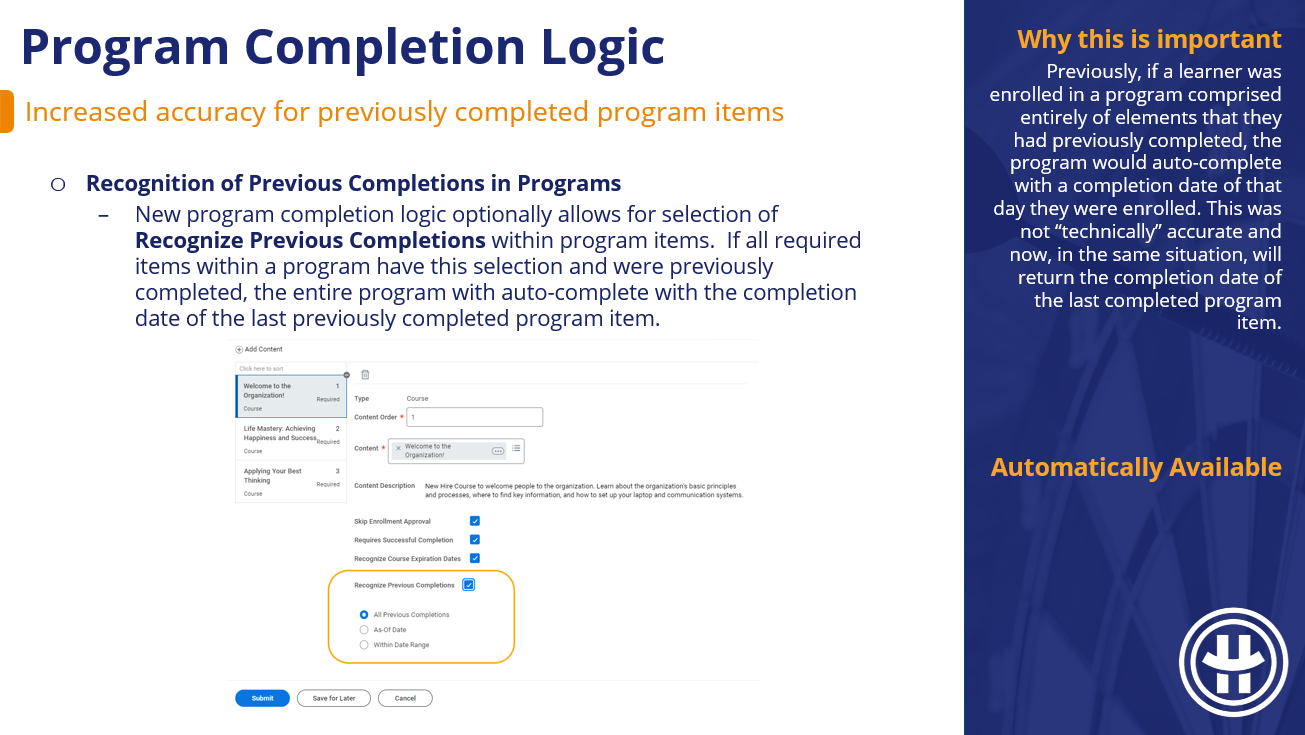
Program Completion Logic
Automatically Available
Previously, if a learner was enrolled in a program comprised entirely of elements that they had previously completed, the program would auto-complete with a completion date of that day they were enrolled. This was not “technically” accurate and now, in the same situation, will return the completion date of the last completed program item.
Assignments on Learning Content
Automatically Available
Historically, Learning Assignments have been pesky to track down. Learning Assignments result from automation such as retraining, and while they show up for the learner, they don’t show up in all the places learning enrollments do (learning transcript) until the learner takes action on them. These enhancements will make Learning Assignments much easier to keep track of and audit.
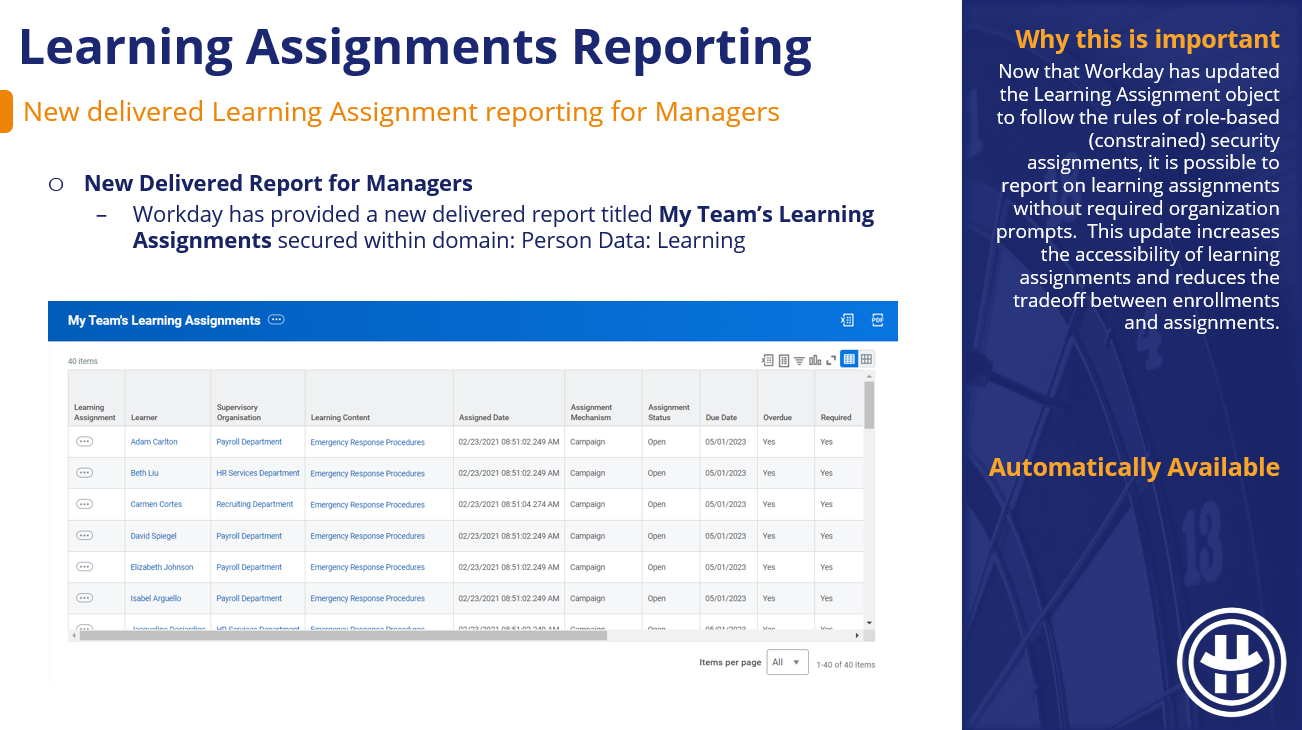
Learning Assignments Reporting
Automatically Available
Now that Workday has updated the Learning Assignment object to follow the rules of role-based (constrained) security assignments, it is possible to report on learning assignments without required organization prompts. This update increases the accessibility of learning assignments and reduces the tradeoff between enrollments and assignments.
Assignments Security Update
Automatically Available
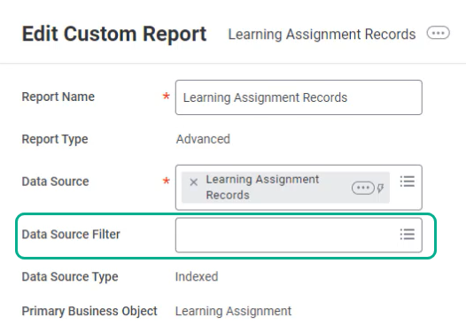
There is a theme this update cycle of normalizing learning assignments and access to them. To that end, learning assignments are now accessible by role-based security where previously it was only unconstrained access. Going forward, Learning Assignment reporting will no longer require data source filters, and the output will only be what end-users have access to based on their role.
Waive Assignments Security Update
Setup Required
Many places in Workday Learning’s security landscape only take user-based and unconstrained security groups, making it difficult to decentralize learning-related tasks & actions. This update will allow for role-based security groups to waive learning assignments for the cohort they support, lessening the bottleneck of who is able to waive.
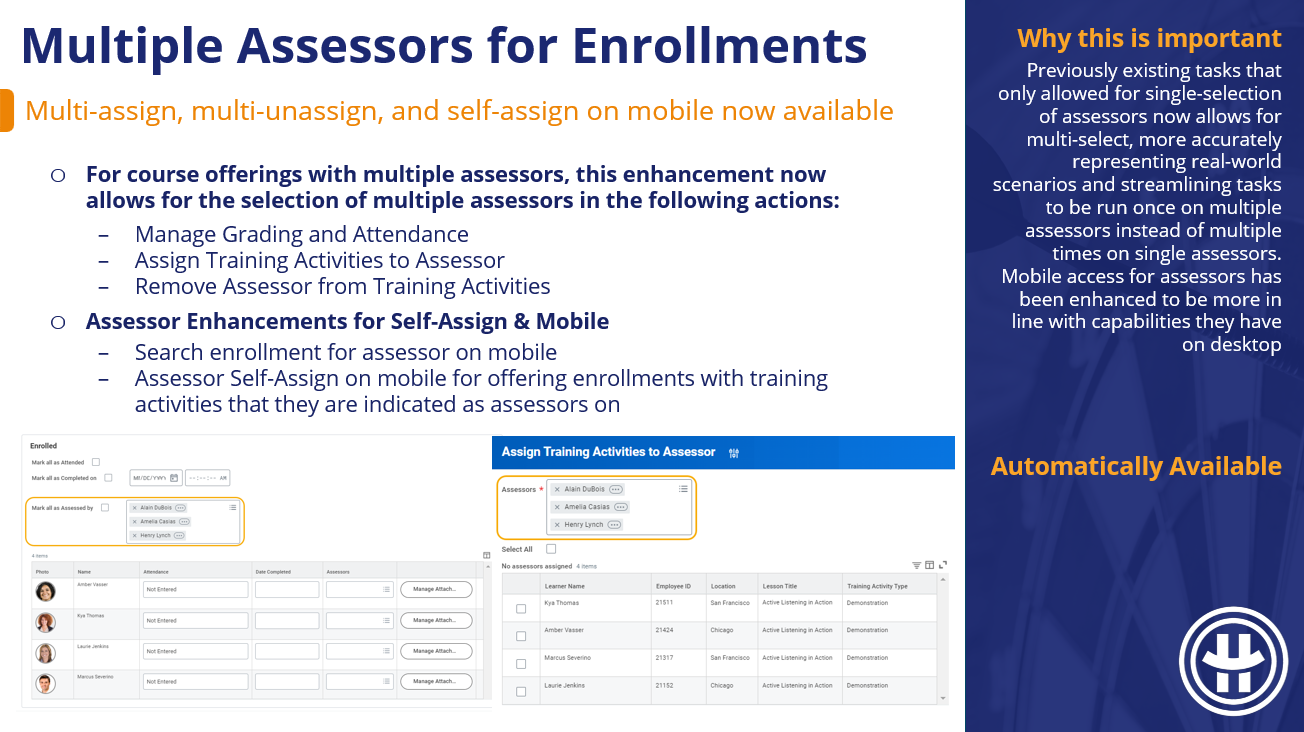
Multiple Assessors for Enrollments
Automatically Available
Previously existing tasks that only allowed for single-selection of assessors now allows for multi-select, more accurately representing real-world scenarios and streamlining tasks to be run once on multiple assessors instead of multiple times on single assessors. Mobile access for assessors has been enhanced to be more in line with capabilities they have on desktop
Internal Assessor Management
Setup Required
This update allows for greater control over who can create and/or edit internal learning assessors, as well as the new ability to inject reviews and approvals into this action. This change will also make it easier to report on these events.
Zoom Virtual Classroom Integration
Setup Required
With hybrid & remote roles remaining prevalent, the flexibility of virtual classrooms for course content is an important feature. This delivered integration with Zoom speeds up and standardizes the process of Zoom virtual classroom creation so we no longer need to (but still can) manually add virtual classroom links.
Extend Indexed Data Sources
Setup Required
I most frequently see the custom data source extension functionality leveraged when a client wants to add a facet filter to a search report that is not presently available. Workday Learning is rife with delivered search reports, but we were limited in our ability to add custom filter options. With the inclusion of Learning data sources available for extension we can now add new and custom filters to our search reports.
Skills Import for Skillsoft Percipio
Setup Required
With this update, external learning content can plug in more seamlessly to skills machine learning. Previously, (and presently for other 3rd party providers), any skill information on that course displays as a tag. This is misaligned with internal content where skills from skills cloud and maintained skills display, are searchable, and drive skill recommendations & suggestions.
Skills Import for Udemy
Setup Required
With this update, external learning content can plug in more seamlessly to skills machine learning. Previously, (and presently for other 3rd party providers), any skill information on that course displays as a tag. This is misaligned with internal content where skills from skills cloud and maintained skills display, are searchable, and drive skill recommendations & suggestions.
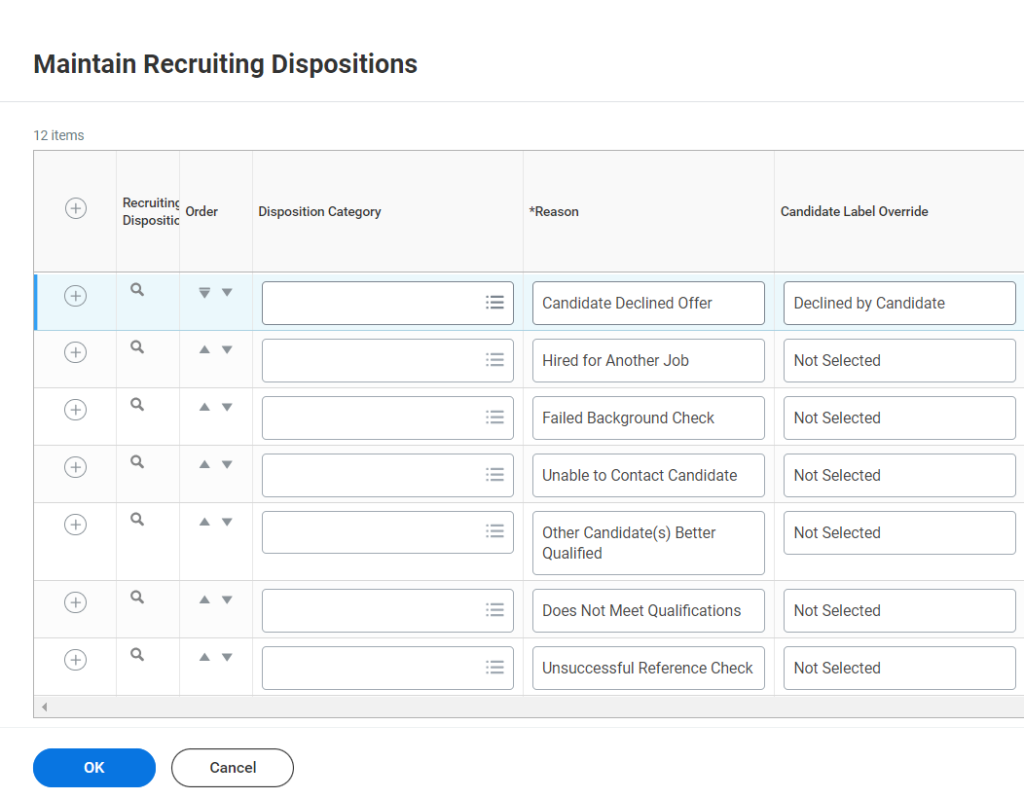
Disposition Reasons are a critical and sensitive touch-point between candidates & recruiters. Historically, they could be unruly to deal with. As a product of Workday’s 2024 R1 updates, Disposition Reasons just got easier in two significant ways; categorization of the list & custom disposition notification creation.
Disposition Categories
This update is going to make it easier for recruiters to find the right disposition reason. If you have a long list of very specific dispositions in each stage of the job application process, this update is for you. Workday now allows you to apply a Disposition Category to each of your Disposition reasons, which recruiters can leverage in navigation when attempting to disposition a candidate.
As an added benefit, Disposition Category is now a field we can leverage in summary reporting to help us identify trends without all the noise of dozens of specific disposition reasons.
Disposition Notifications
This update, personally, will get the award for saving me the most time. Previously, to create unique notifications off specific disposition reasons (EX: Position Closed), we had to create a notification for each Job Application section where it appeared as an option. So if I get a request for a specific notification to go out to candidates dispositioned when a position is closed, and the disposition reason “Position Closed” appears in Review, Screen, Assessment, Interview, Offer, Background Check, and Reference Check, I will need to create the same notification 7 times off each of those 7 specific triggers.
You can see how this quickly spirals into hundreds of notifications. Now with Workday’s Notification Trigger on Disposition update, this scenario is a thing of the past. If I need a specific notification for a disposition reason (or several disposition reasons) I only need to create one notification instead of seven.
The set-up is easier. The maintenance long-term is easier. But the “old way” of creating them via On Entry > Conclusion > Disposition Reason (Stage) is still available. The current disposition notifications you may have now are “fine”. They still work. Because I am a subscriber to the “If it’s not broke, don’t fix it” philosophy, I don’t think updating your existing disposition notifications to this framework is hair-on-fire necessary. But I do think conversion at some point is worth the effort; this is sure to be a call-out on optimization efforts going forward.
What’s Automatically Available in Recruiting 2024 R1?
What’s Automatically Available in Recruiting 2024 R1?
For this go-round, there’s only 1 Automatically Available update in the realm of Recruiting – and the argument could be made that it’s not technically Automatically Available because you have to opt-in via Maintain Feature Opt-Ins in Production. This update has also been slightly delayed; appearing in preview tenants March 15, 2024 and Production tenants on April 19, 2024.
This update defaults to “on” in your preview tenant but you will have to enable it in Production via the Maintain Feature Opt-Ins task. The feature you are looking for is titled “External Career Site Apply Flow Improvements.”
External Career Site Job Applications
Without further ado – the 2024 R1 Recruiting Update in question is External Career Site Job Applications. Workday’s done a smattering of revamping within the External Career Site functionality to make things more intuitive, accessible, and efficient for applicants. It’s a bit of a bundle-situation; while technically only 1 update, there are several pieces involved. Below, we walk through each of the external career site components that are changing.
Candidate Home Account Creation
This is my favorite component of this update. If Candidate Home Accounts are required, Workday now includes the task to create a candidate home account within the progress bar of the application.
Errors & Warnings
One of the more noticeable updates of this grouping, the UI for Errors & Alerts has changed slightly. Instead of appearing on the right-hand rail, they are now bundled into a banner at the top of the section.
Country Default on My Information Page
It’s unlikely I would have noticed this if Workday had not said anything, but Workday has made the Country field defaulting a bit smarter. Previously, this field defaulted based on the primary location of the position if a candidate wasn’t applying with a resume or previous application. Now, Workday sequentially considers the factors below in it’s auto-population decision:
Address provided in any application
Country from a candidate’s resume (if applying with a resume)
Country from a LinkedIn profile (if applying with LinkedIn)
Country based on the candidates browser language setting
Job Posting primary location
The default country selection within Edit Tenant Setup – System
Questionnaires
If you include questionnaires with branching questions, the load-time here has been improved. If you include numerical questions in your questionnaires (EX: desired salary), there are no longer numerical limits. Inflation, am I right?
Websites URLs
If you are leveraging this section, your applicants no longer need to include http:// or https:// as a precursor to their website URL.
Social Network URLs
Workday used to default social networks for candidates into new applications even if they selected “Apply Manually.” That auto-population will no longer occur.
What’s Automatically Available in Learning 2024 R1?
What’s Automatically Available in Learning 2024 R1?
A lot! We’ve got six automatically available updates with the general theme being efficiency and data availability. Less digging for the tasks and information you need, less manual effort to perform actions in bulk. Let’s take a look at what’s showing up in your Production tenant!
In the spirit of providing more relevant information on offering tables during enrollments, Workday has updated the offerings table for the following enrollment tasks:
Learning Facilitated Enroll
Learning Mass Enroll (Mass Enroll button)
Manager Enroll (Enroll My Team button)
Mass Enroll by Role
Updates include:
Combining seats available & capacity into one Availability column
Cost & Version display if and only if there are values populating
Location now displays the location of the lesson, rather than the primary location
Offering Number column displays a unique ID to differentiate between offerings
Select Offering Redesign – Learners
Like the redesign for Admins & Managers, the focus here for Learners is more relevant information, front & center. When selecting an offering, the offerings are now automatically sorted by start date and available capacity. Lesson location, cost, and version are included in the table if applicable, and there is a back/review button to toggle between a selected lesson and the general offering screen. Workday has also incorporated their “pop-up modal” that we’re seeing sprinkled across a few functional areas (thinking goals). The Select Offering, Review & Confirm screens no longer navigate you to a new page.
Initial Assignment & Retrain Window
The retrain window functionality has historically been a bit confusing and counter-intuitive. This update aims to inject clarity and reduce duplicative completions. The below two scenarios outline expected behavior:
If a learner completes an initial assignment inside of the retrain window, the next expiration date (not the current) will apply for their retraining assignment
If a learner completes their initial assignment outside of the retrain window, the current expiration date will apply for their retraining assignment.
Get Learning Courses Web Service
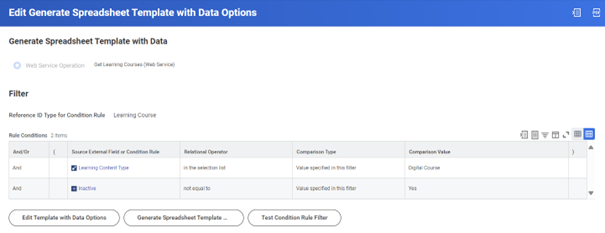
It is now possible to generate the Manage Learning Course EIB with data! At the moment this is not applicable for Programs, but blended and digital courses are fair game. Historically, this EIB was not an efficient option because it would clear out any existing course information that wasn’t explicitly included. Without the ability to populate the spreadsheet with data, that effort was incredibly time consuming. Going forward, making edits to courses in bulk can be much more efficient.
Mass Enroll in Course Offering
Short, sweet, and to-the-point. Workday has made it easier to enroll learners into a course offering in bulk. The pathway to follow from the related actions of a course offering is Course > Mass Enroll.
Mass Drop Program Enrollments
Sticking with the theme of actions done in bulk, Workday automatically delivers the ability for Administrators to mass drop learners from programs.
A lot! Most of the Talent Optimization updates for 2024 R1 were automatically available! Let’s take a look at what should now be showing up in your Production tenant.
Dynamic Talent Pool Membership
Save Jobs to Career Hub Plan
Gigs Rebrand to Flex Teams
Skills Miscellaneous Enhancements
Talent Miscellaneous Enhancements
Dynamic Talent Pool Membership
Workday’s now running a background process daily to update the membership of your dynamic talent pools. You don’t have to do anything except expect more accurate membership in your dynamic talent pools. They’ve also thrown a membership count column into delivered report Talent Pools, and the ability to manually update membership if you need to see the latest-and-greatest right now.
Save Jobs to Career Hub Plan
Within Career Hub, end-users now can save Jobs to their Career Hub Plan like they can Mentors and Connections.
Gigs Rebrand to Flex Teams
The title “gigs” didn’t seem to represent the functionality behind it or help anyone discern what it was for. “Flex Teams” will hopefully close that gap. But, if you disagree and finally got your team used to the “gigs” verbiage, you can keep it via Custom Labels
Skills Miscellaneous Enhancements
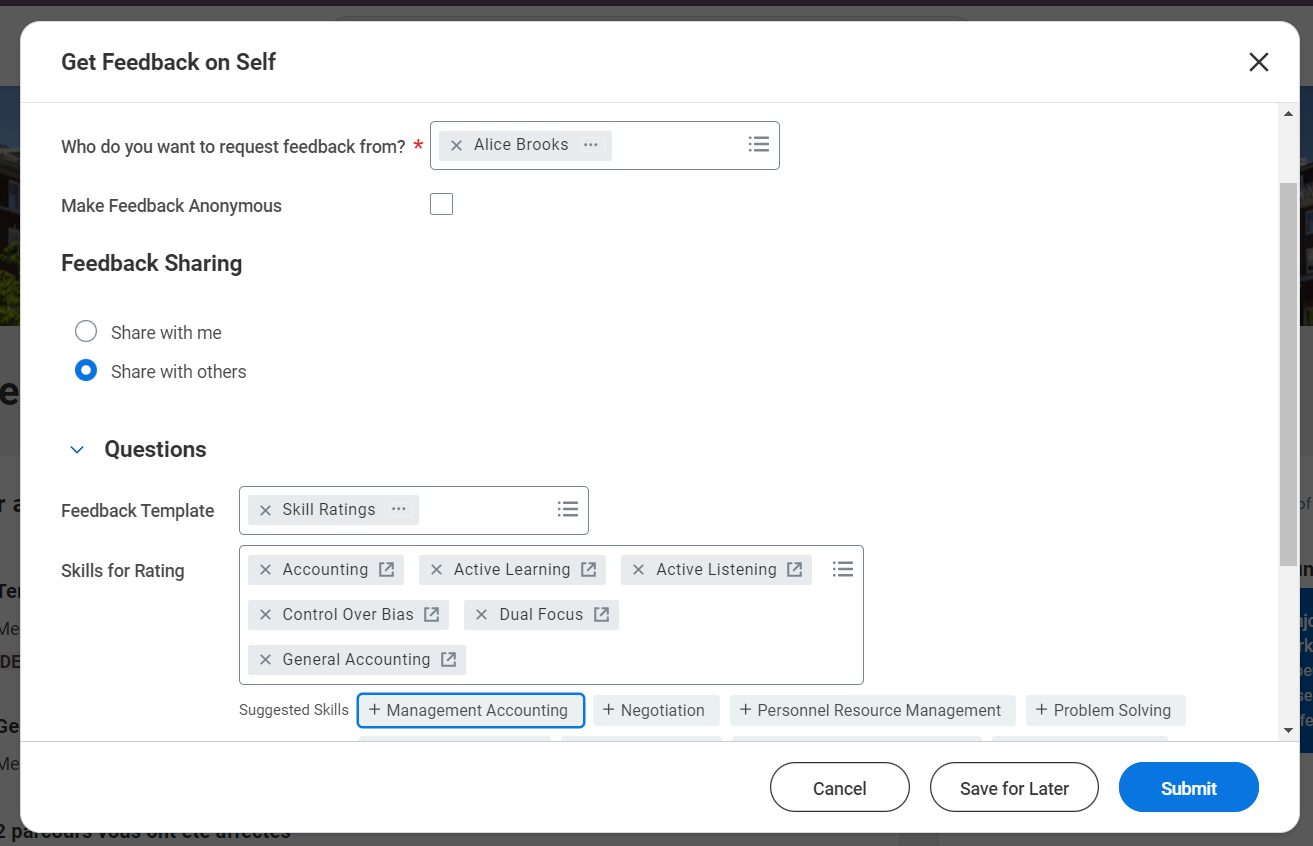
The cap on the number of skills you can request ratings or endorsements for via Feedback has increased from 5 to 100.
Talent Miscellaneous Enhancements
Gig Images: 8 new gig cover image options
Career Hub for Mobile: Career Hub mobile improvements by allowing for filter and search on Browse All pages
Employee Reviews Started Field: When viewing an employee review template, it now displays the number of employee reviews that have been initiated.
Locked Feedback Template Warning: Workday no longer throws a warning when an end-user selects a locked-template to request feedback if all available templates are locked.
Manager Insights Hub Security: Manager Insights Hub has added security configuration options for Suggested Opportunities.
Manage Goals EIB: The Manage Goals web service can now leverage goal instances.
The short answer? A lot! the 2023 R2 Workday® Updates AND the 2024 R1 Workday® Updates included enhancements to the Goal setting functionality within Talent Optimization for the first time in a while.
Goal interface prior to 2023 R2, after the 2023 R2 update cycle, & after the 2024 R1 update cycle
So what?
What’s the point? Workday® Goals are now much easier for end-users to interact with; fewer clicks, more intuitive actions, and the information you need front-and-center. Your internal team should get fewer goal-related questions, and there are more opportunities to customize the information you collect.
A walk down memory lane
Before we get into the details, let’s revist what the Workday® goal interface used to look like prior to the Goal User Experience Redesign. The UI was a bit dated and the Maintain Goal Setup task only allowed us to include or exclude goal elements, not optionally hide or require based on security.
What changed in 2023 R2?
In the 2023 R2 batch of updates, Workday® did the following:
Overhauled the task Maintain Goal Setup to hide or require optional fields
Introduced the “card” layout (akin to the People Experience homepage aesthetic)
Bundled Individual Goals, Archived Goals, and Organizational Goals together into one Goals tab
Replaced the general Edit button with more intuitive Create, Edit, and View options
Introduced an icon for when a goal was locked
What changed in 2024 R1?
In the 2024 R1 batch of updates, Workday® did the following:
Renamed Restore Goals to Unarchive Goals
Added an Archive or Unarchive button
Introduced side card pop-out functionality for viewing & editing goals
Included Category on goal cards
Getting Started with the new Goal User Experience
This feature remains Opt-In (for now) but is automatically turned on in non-Production tenants. To enable in Production, navigate to Maintain Feature Opt-Ins and opt-in to the Goals User Experience Redesign Changes.
Once you do this, you should also update your profile group configuration for the Worker Profile > Performance section. The new Goals tab combines what was previously two separate tabs for Individual Goals and Archived Goals.